Sep 8, 2016 | Announcements, Weekly Hunt
We have released a new, albeit small, update to the Eventzee app. This new version sees a few minor changes along with one fairly substantial removal.
-The Calendar page has been removed from the app for the time being. The free hunts will continue via text Join Codes found on our social media pages and marketing emails. This is to declutter the initial experience of the app- specifically for new users at private events. There are plans to add in a reformed version of this page in the future, but for now players will have to join the hunts via public codes.
-With the removal of the calendar we have added an “Exit” button to event page on iOS. Exiting an event will take the player to the My Events page now. This replaces the previous way of exiting an event by clicking the date of the hunt.
-The “Message” icon has been added to the clue list, leaderboard and map pages. This is to ensure players can easily find and message event admins.
-A link to the event photo gallery is now available in the app’s leaderboard. Now you can see some of the photos other players have submitted and had approved.
-Minor bug fixes.

Aug 8, 2016 | Announcements, Hunt Tips
We’re proud to announce the release of Eventzee 1.7 for Android and iOS devices. This new update is one of the biggest updates we’ve done since launching the app! We’ve introduced a new clue type, changed up some features to make your experience even better and fixed a few issues. Download the update today!
New features include:
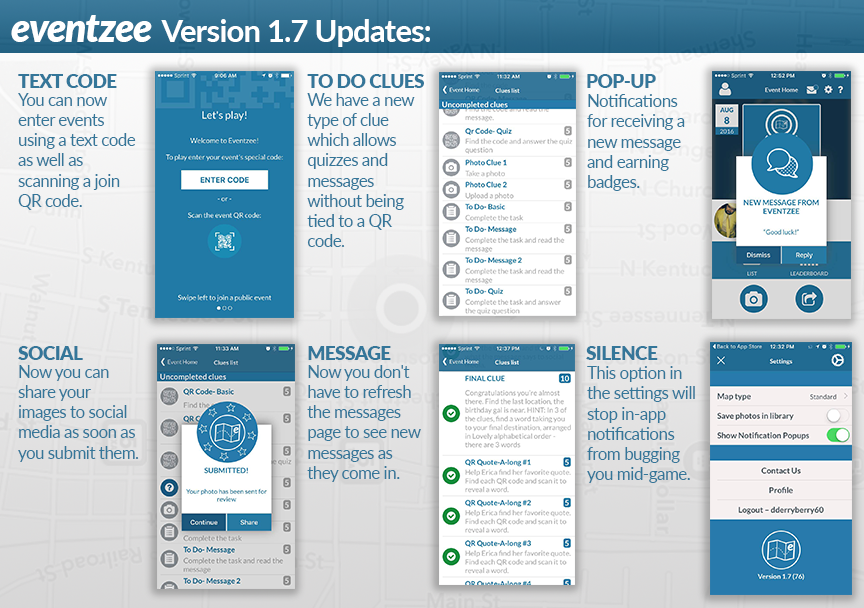
- JOIN TEXT CODE:
You can now enter events using a text code as well as scanning a join QR code. Try the code “WW72” to join our free weekend hunt!
- TO DO CLUES:
We have a new type of clue which allows quizzes and messages without being tied to a QR code.
- IN-APP NOTIFICATIONS:
New notifications for receiving a new message and earning badges.
- ABILITY TO RE-LOOK AT MESSAGES AND QUIZZES:
You can now access quizzes and messages information again after you have already completed the clue.
- SHARE TO SOCIAL AT SUBMISSION:
Now you can share your images to social media as soon as you submit them.
- REAL TIME MESSAGING:
Now you don’t have to refresh the messages page to see new messages as they come in.
- TURN OFF ALL POP-UPS/NOTIFICATIONS:
This option in the settings will stop in-app notifications from bugging you mid-game.”
- iPAD SUPPORT:
Now you can play Eventzee on your iPad!
- VARIOUS BUGS FIXES:
Be sure to join this weekend’s free photo scavenger hunt to test out these new features. To join these hunts, just find the Weekend Warriors event on the Eventzee in-app calendar and RSVP, scan the week’s join QR code OR use the new text feature and type in “WW72” to join. If you’re interested in hosting your own Eventzee hunt please contact eventzee@munzee.com and we’ll get you set up with the right package.
Jun 8, 2016 | Announcements, Weekly Hunt
 We need YOU!
To approve Eventzee photos.
We are formally requesting applications for guest Eventzee admins for our worldwide scavenger hunts. The Eventzee staff will be out of town the first weekend of July at Munzee’s Birthday Bash in Denver, CO. We’ll be super busy hosting a number of photo scavenger hunts that weekend so we are looking for help to run the Weekend Warriors free photo scavenger hunt.
For those interested we ask that you email eventzee@munzee.com answering the questionnaire listed below. Please include “Eventzee Guest Admin” in the subject line. Depending on the number of applicants we will decide how to move forward with this program and future uses for guest admins.
Due to the importance of the role, we are requiring that all applicants have run their own Eventzee hunt at least once prior to applying.
Thank you to all of our players for the support! We look forward to growing the game!
APPLICATIONS MUST BE SUBMITTED BY JUNE 22nd 2016.
Name:
Username:
Where do you live?
Have you run an Eventzee photo scavenger hunt before? If so, what was the name of the hunt?
What were some of the biggest struggles you faced when hosting your photo hunt?
Looking back, what would you do differently when running your photo hunt?
When approving photos what do you look for?
When adding photos to the gallery what do you look for?
What are 3 telling signs that a submitted photo is a screenshot?
What makes you stand out among other applicants as an Eventzee Guest Admin?
Are you free between Thursday June 30th through Sunday July 3rd?
Apr 6, 2016 | Announcements
We’re proud to announce the Eventzee Version 1.5 update for Android and iOS devices is now available. We’ve introduced a new type of QR Code Clue and worked out some UI/UX issues. Download the update today!
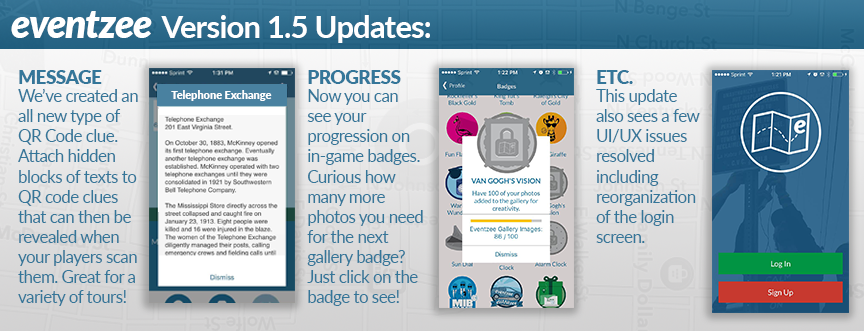
- HIDDEN MESSAGE OPTION:
We’ve created an all new type of QR Code clue. Attach hidden blocks of texts to QR code clues that can then be revealed when your players scan them. Great for a historical tours, nature walks, campus adventures and more!
- BADGE PREOGRESSION:
Now you can see your progression on in-game badges. Curious how many more photos you need for the next gallery badge? Just click on the badge to see!
- UI/UX FIXES:
This update also sees a few UI/UX issues resolved including reorganization of the login screen.
Be sure to join this weekend’s free photo scavenger hunt to test out these new features. To join these hunts, just find the Weekend Warriors event on the Eventzee in-app calendar and RSVP or scan this week’s join code found on the blog. If you’re interested in hosting your own Eventzee hunt please contact eventzee@munzee.com and we’ll get you set up with the right package.
Jul 31, 2015 | Announcements
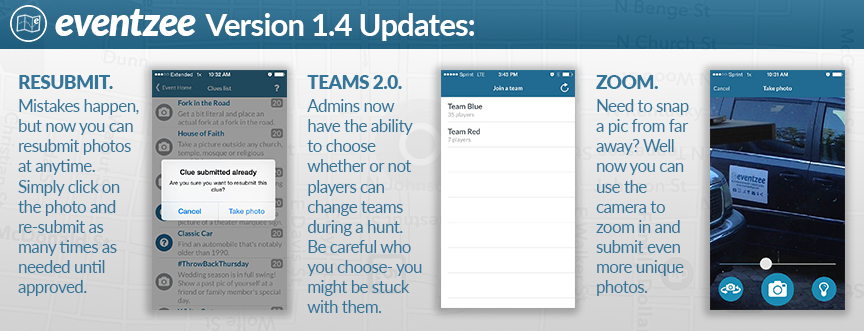
We’re proud to announce the Eventzee Version 1.4 update for Android and iOS devices is now available. Although this version of Eventzee is light on new additions, one big feature (some might say a necessity) is the ability to resubmit photos after you have already sent one to the Admin. This is something that players have been asking for since we started and we’re now happy to say you can resubmit photos without having to wait for Admin rejection.
Along with the resubmit option we have made a couple more tweaks to enhance the overall hunt experience:
- RESUBMIT PHOTO OPTION:
We get it, sometimes mistakes happen and sometimes you might submit the wrong photo to the wrong clue. Now instead of waiting for the Admin approvers to reject your submission you can resubmit right in the app. Simply click on the photo and re-submit as many times as needed. Be cautious though because re-submitting a photo will erase the original photos submission time. Once a photo is approved you will not be able to resubmit.
- ADMIN CHANGE TEAMS:
Although players in Team Hunts have always had the ability to switch teams whenever they feel like, Admins now have the ability to choose whether or not players are able to. So if the Admin chooses to, you’re stuck with your team so choose wisely.
- CAMERA ZOOM (iOS Users):
Need to snap a pic from far away? Well now you can use the camera to zoom in and submit even more unique photos. This feature has been a part of the Android version for a while now, but iOS users can finally grab those hard to get photos too.
- SLIDESHOW GALLERY (Desktop only, not in-app):
We have also updated the desktop gallery to feature a slideshow option. Now when you look back on the photos from your hunt you can watch along easily. This new addition to the galleries is perfect for on-site photo hunts so you can see the photos as they come in. To check out this new feature visit eventzeeapp.com/gallery (or the private link we have sent you for your event), click on a photo and then press the triangle “PLAY” button in the top right corner.
Be sure to join this weekend’s free photo scavenger hunt to test out these new features. To join these hunts, just find the Weekend Warriors event on the Eventzee in-app calendar and RSVP or scan this week’s join code found on the blog. If you’re interested in hosting your own Eventzee hunt please contact eventzee@munzee.com and we’ll get you set up with the right package.
