Jan 21, 2016 | Announcements, Hunt Tips, Weekly Hunt
We are proud to announce that a new line of badges have been released based on your completion time of Eventzee scavenger hunts. The Clockstoppers line has been created with the intent of awarding how quickly (or sometimes slowly) it takes you to complete a hunt. While we always encourage creativity, there are many ways to play Eventzee and one of those is fast.
THE CLOCKSTOPPERS LINE:
The trick with these badges though is that simply finishing the hunt in one hour will not earn you all three badges. Your submission time for all clues has to be within the correct timeframe for each specific badge. So if you finish a hunt in 2 hour and 30 minutes, you will earn the Alarm Clock, but not the others.
It will take careful planning for these badges, because if even one of your submissions is declined by an approver it could inflate your submission time by the time you resubmit. You can see your current submission time on the event leaderboard. This can be found by going to the specific event’s gallery and clicking the leaderboard link. Remember that your submission time is the amount of time between your first and last submission. In order to earn these badges you will have to COMPLETE ALL CLUES for the hunt in the specified time frame.
These badges can be earned in any Eventzee event including our free weekend photo scavenger hunts, Munzee events, and both photo and QR code hunts. Badges will be awarded 24 hours after the hunt has ended. These badges are also retroactive, so if you have completed a hunt in one of these time frames before you will be credited the badge.
Remember the best way to get all the badges is to play in multiple hunts, so join our free photo hunts each week. Our Weekend Warriors photo hunts are every weekend and completely free for anyone to play. 15 clues go live every Thursday at 3 PM CST and you have until Sunday at 3 PM CST to complete the clues.
Time is ticking…

Jan 20, 2016 | TESTIMONIALS
In “Eventzee Exposure” we look at testimonials from happy clients who have hosted their own Scavenger Hunts. Our users’ experience is very important to us, so when things go off without a hitch we want to cheer about it. If you’d be interested in sharing your Eventzee experience please reach out to iloveyou@munzee.com!
Host: CommSoft
Location: Boulder, Colorado
Event Breakdown:
CommSoft, a software company in Northeast NY, utilized the Eventzee program for a Scavenger Hunt as part of their yearly Users’ Conference. CommSoft has users from all over the country and once a year they host a 3 day conference filled with classes, networking and extracurricular events. One such evening event was an Eventzee Scavenger Hunt in Boulder, Colorado which included the establishments on and near the Pearl Street Marketplace. They had 14 teams comprised of CommSoft personnel and conference attendees as well as a “command center” back at the conference hotel where they approved photos and had the leaderboard posted.
Testimonial:
“Having the Eventzee software for both our participants and for me as the admin back at the command center was essential to the success of this event. Both the app and admin portal were easy to configure and utilize. I only had limited time to get my CommSoft personnel up to speed on using the app due to our scheduling (approximately an hour…) and they picked it up immediately. The folks who stayed back at the command center loved watching the pictures coming in and tracking the action via the leaderboard.
We ran a scavenger hunt at a previous conference but did it all “by hand”. We handed out paper lists of the hunt items and had the teams text the photos to one person at the command center as they went along. The pictures arrived in a crazy frenzy and we had no good way to go through them and segment them by team etc. In the end we were really unable to track it all..it was a mess. Using Eventzee was like night and day from our previous experience. It made it so easy to track that I actually had time to enjoy the photos as they were coming in rather than just trying to track them. And it made it so much easier to tally the results as it was all within the system itself. No need to keep track of points manually. Finally, it gave us more of a “high tech” look than handing out a bunch of papers and pens. We are a software company too after all. The Eventzee team was so easy to work with from start to finish and even including the evening of our event. They were there for us if we needed them (though we didn’t) which was a great comfort.”
–Laura Knussman, Manager of Marketing and Product Management, CommSoft
Photo Clue Examples:
- Tunnel Vision- Find another team and form a “high five tunnel” with a passerby (not a conference attendee) running down the middle.
- Masonry- Take a photo of a lineup of mason jars filled with elixirs.
- Cyclical- Find the sign made from a major bicycle part.
- All I Got Was This T-Shirt- Find three people wearing t-shirts with city names on them but they are all different cities
- Full House- Take a photo of your entire team playing poker.
- Ballin’ – Photo of a Ball of Twine bigger than a basketball.
Photo Examples:
About CommSoft:
For 30 years CommSoft has been an industry-leading software development organization. Their end-to-end billing and OSS software suite can cover a myriad of voice, video, data, and wireless services from a common platform. They have served over 50 communication companies by providing integrated and automated telecom software solutions. Among their strengths is an open architecture and expansive library that can integrate seamlessly with other business services and network infrastructures.
To learn more about CommSoft visit:
http://www.commsoft.net/
Jan 13, 2016 | Announcements, Hunt Types
Scavenger hunts have always been a fun way to interact with others and support camaraderie, but we’ve moved past the limitations of pen and paper. Eventzee takes scavenger hunts to a whole new level by supporting worldwide events and new ways to interact with players. While Eventzee makes it easy to host your own scavenger hunt, it’s up to YOU to make it memorable. So if you’re considering putting on your own, here’s a few tips to get you started.
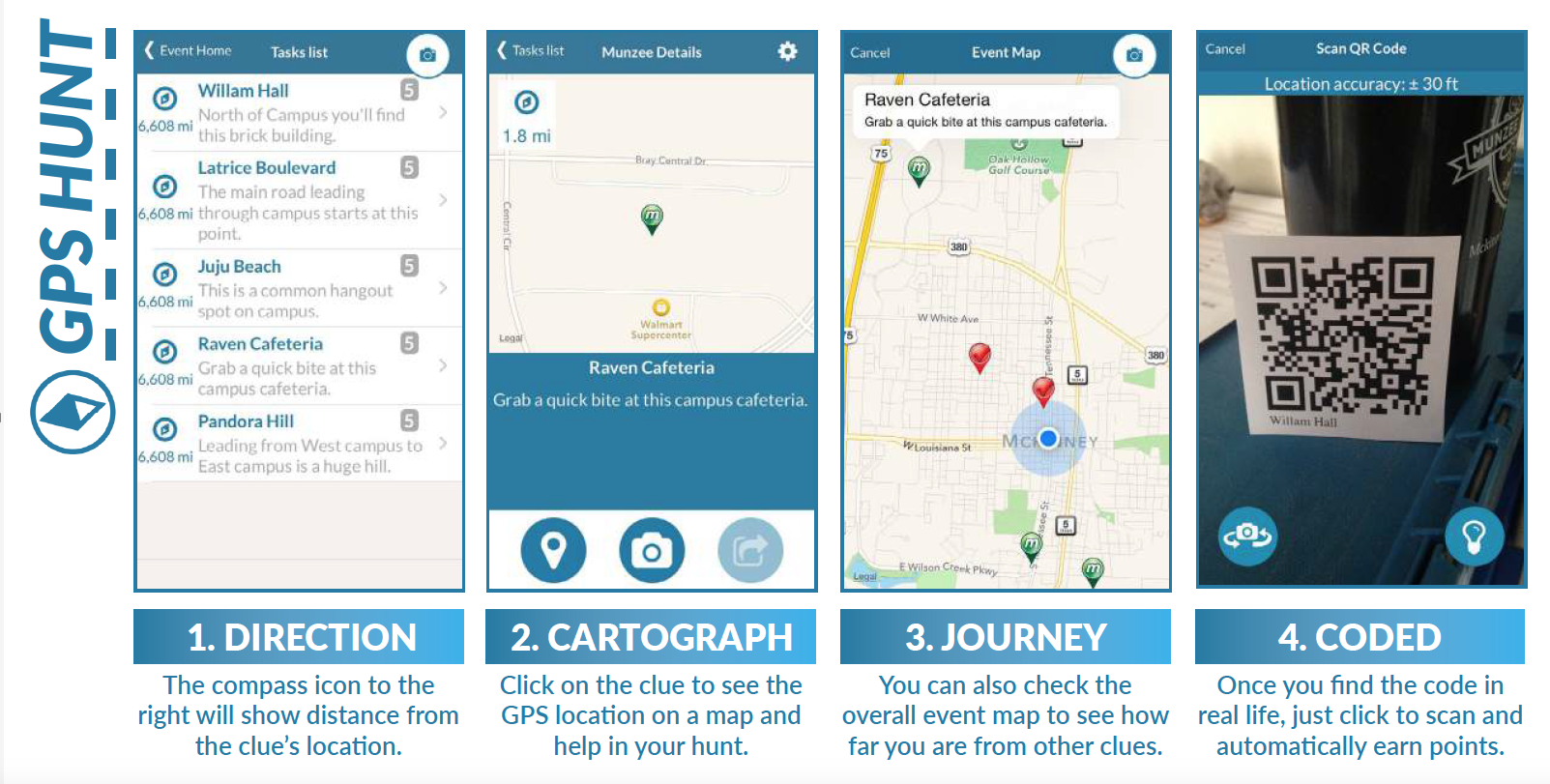
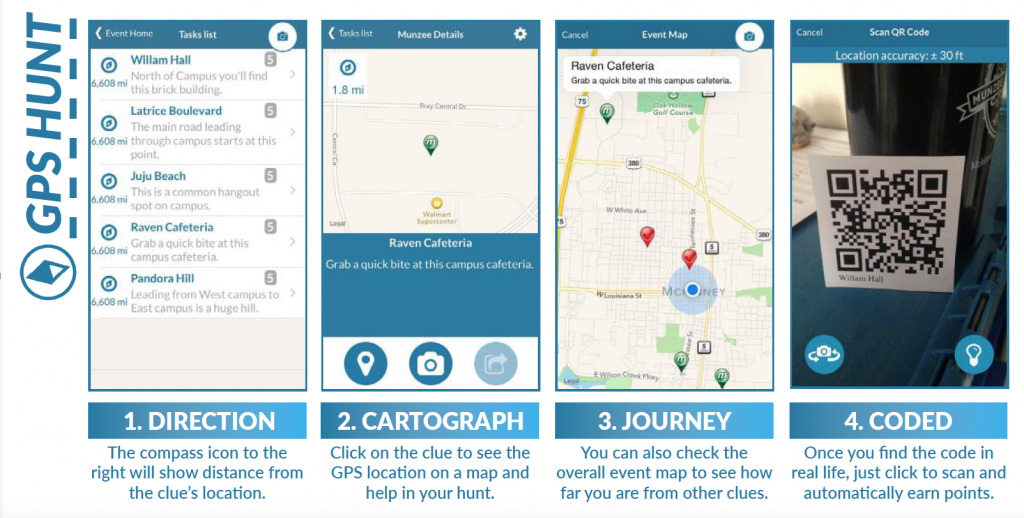
While photo hunts are totally fun and encourage social interaction, QR Code scavenger hunts can be used in a number of educational ways. When hosting your own hunt you may choose to use QR clues, which can be converted into a quiz or a GPS clue as well. GPS clues are especially handy if your hunt is throughout a city or campus with distinct locations.
Topographical Tourists
Eventzee GPS Hunts are great for showcasing unique and unknown parts of your town or city. Whether it’s historically important locations or simply a map of local restaurants, adding GPS coordinates to a clue is a fun way to get players exploring the places around them. Each clue’s location also shows up on the Eventzee map so it’s perfect for tours of all sorts.
We’ve Got Spirit How About You?
It’s not easy to get around campus your freshman year, but an Eventzee GPS hunt can be a fun way to help educate new students about their surroundings. Map out financial buildings, sports complexes and more important locations for your campus. You can even attach quiz questions to each location to test new students knowledge about the history of each building.
Late Night Latitude
Planning a night out? Pub crawls are a great social activity that double as a way of exploring a city’s unique nightlife locations. Get a group together and schedule out your whole night with Eventzee. Check in at each bar with GPS clues, then include fun photo clues to make the night unforgettable.
Creating Your GPS Hunt
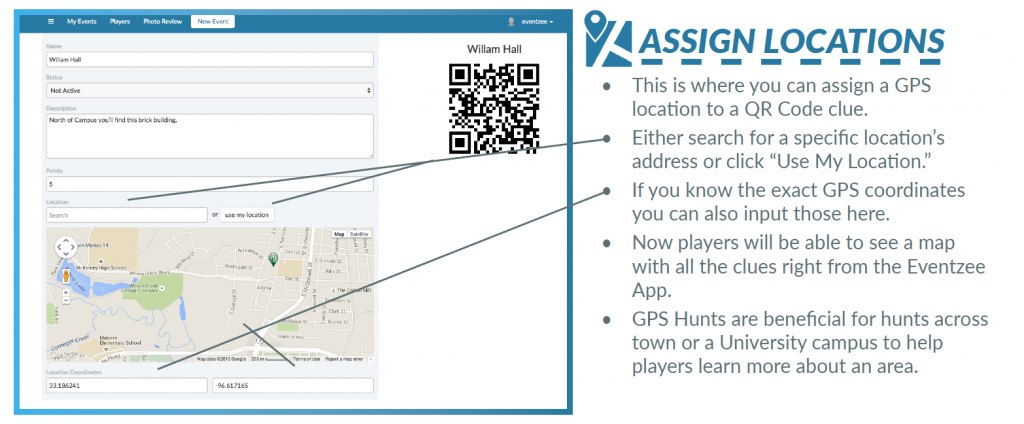
Setting up GPS clues is easy. When you’re first creating your hunt you simply make sure the hunt is “Geolocation Based.” From there you’ll just add clues like normal with a clue name and description.
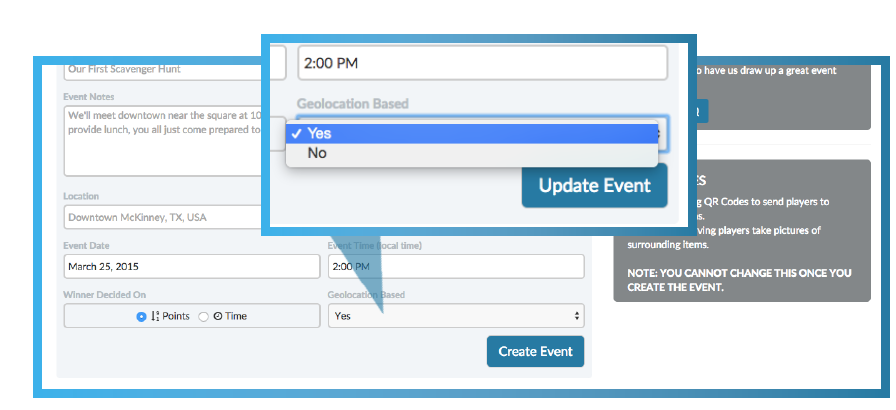
To set the GPS coordinates for an individual clue you’ll click on the gear icon to access the clue’s settings. There you can either search for the location or add the exact coordinates yourself. Then whenever you’re ready, just place the QR codes at each location.
 Remember, your event is what you make it, but Eventzee is here to make it as easy on you as possible. To get a more in depth look at setting up Eventzee hunts or how to play Eventzee check out the following guides.
Now that you have some ideas about how to start your Eventzee scavenger hunt, go out and make it happen! If you’re interested in hosting an Eventzee event, sponsoring an official Eventzee photo hunt or just curious about what we can do, contact us at eventzee@munzee.com.
Jan 6, 2016 | Hunt Tips
Scavenger hunts have always been a fun way to interact with others and support camaraderie, but we’ve moved past the limitations of pen and paper. Eventzee takes scavenger hunts to a whole new level by supporting worldwide events and new ways to interact with players. While Eventzee makes it easy to host your own scavenger hunt, it’s up to YOU to make it memorable. So if you’re considering putting on your own, here’s a few tips to get you started.
Eventzee makes hosting scavenger hunts easy- but that’s not to say there’s no prep work involved. When hosting an Eventzee event it’s important to keep your players informed and updated on how to play. Whether you’re hosting a get-together with your family or setting up a training session for your staff retreat, the more prep work the better.
Hunt Set-Up
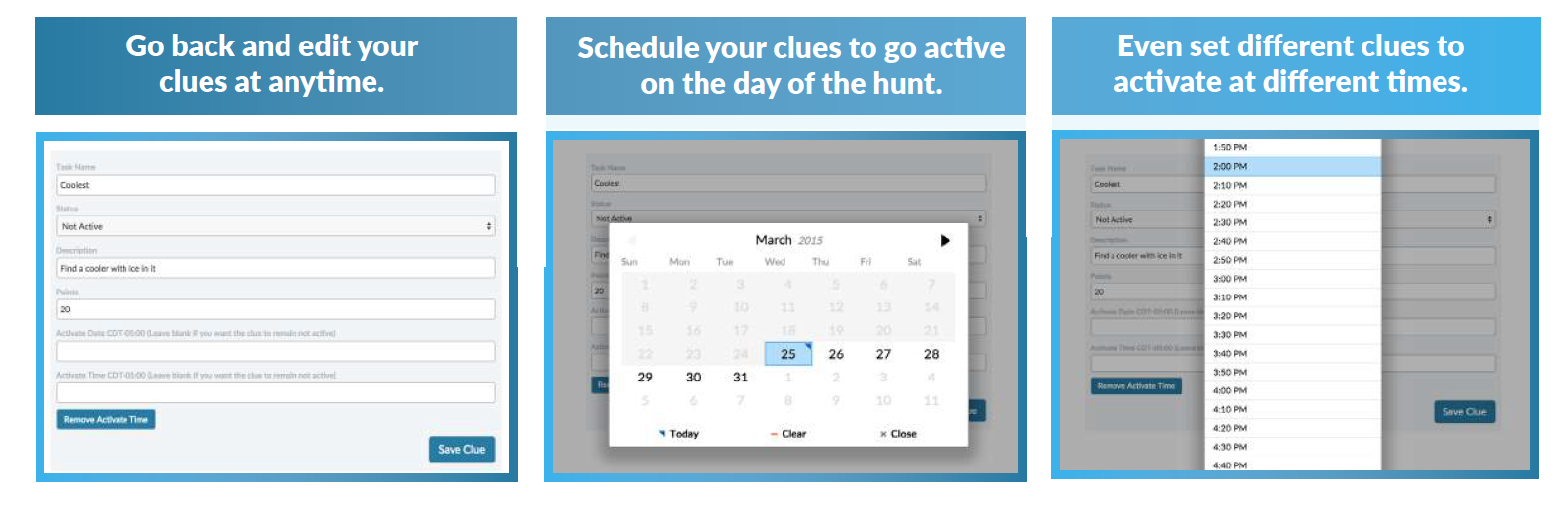
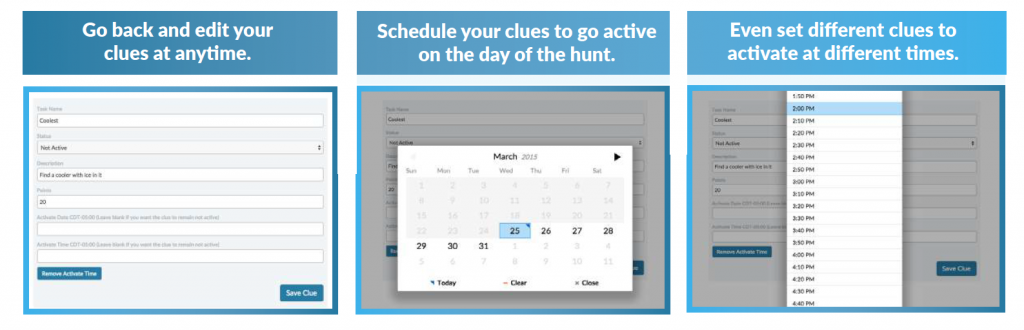
Once you’ve been granted Admin access and created your event, Eventzee makes it easy to schedule clues ahead of time to go live at any point. It’s important to create and input your clues beforehand so you have a chance to make sure everything is ready the day of. There’s nothing worse than trying to juggle a dozen different duties on the day of an event, so don’t be afraid to let Eventzee go on autopilot a bit.
Download The App
Be sure to have everyone involved in the hunt download Eventzee to their smartphones. The free app can be found in the App store for iOS devices and the Google Play store for Androids. It’s best to have players download the app beforehand so they can sign up and not have to wait on the download on the day of the hunt. This will also be important as you share your event’s join code…
Join The Hunt
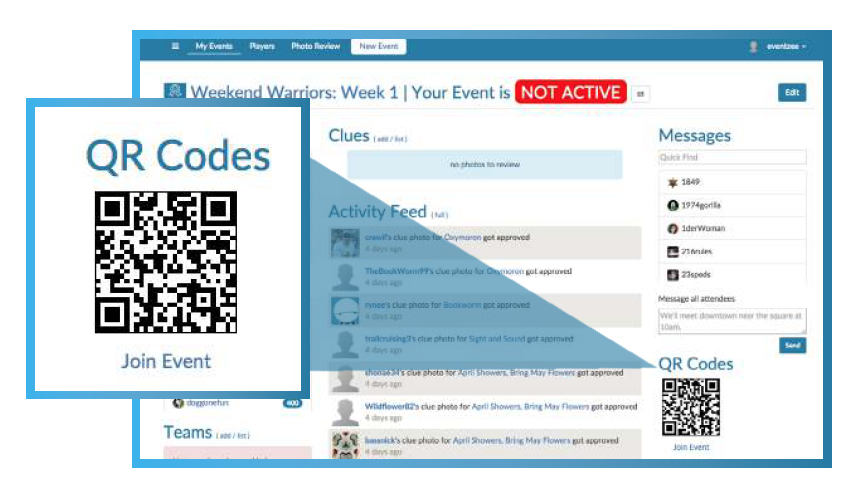
Once your players have downloaded the app they’ll need to create an account to play. They just need to open the app, sign-up for a free account, and create a username and password. Once they’ve signed in they just need to scan the QR code the admin has been given to join. This code can be found in the “QR CODES” section of the admin home page. Again, these are all things we suggest having players do in preparation of your event.
CLICK HERE for the template for the Join Code Flyer.

Remember, your event is what you make it, but Eventzee is here to make it as easy on you as possible. To get a more in depth look at setting up Eventzee hunts or how to play Eventzee check out the following guides.
Now that you have some ideas about how to start your Eventzee scavenger hunt, go out and make it happen! If you’re interested in hosting an Eventzee event, sponsoring an official Eventzee photo hunt or just curious about what we can do, contact us at eventzee@munzee.com.
Dec 31, 2015 | Hunt Tips, Weekly Hunt
By completing a variety of tasks in Eventzee you can earn exclusive badges!
Here is a continuing list of all available badges.
Photographer Line:
Pioneers of Gold Line:
Party Animals Line:
Curator Gallery Line:
Champions Line:
Clockstoppers Line:
Sep 29, 2015 | Eventzee Exposure, TESTIMONIALS
In “Eventzee Exposure” we look at testimonials from happy clients who have hosted their own Scavenger Hunts. Our users’ experience is very important to us, so when things go off without a hitch we want to cheer about it. If you’d be interested in sharing your Eventzee experience please reach out to iloveyou@munzee.com!
 Host: Association For Talent Development- Dallas Chapter
Location: Plano, TX
Event Breakdown:
Eventzee partnered with the Dallas Chapter of ATD to create an engaging experience for the attendees of the Southwest Learning Summit. Combining features from both Photo and QR Code Scavenger hunts ATD used Eventzee to test learning comprehension and encourage networking among the attendees. Photo clues were used to create a fun environment for randomly assigned teams throughout the day. QR Codes were placed outside of each presentation and when players scanned it they were quizzed on the lecture they just watched.
Photo Clue Examples:
- Team Photo- Find as many of your team members as you can at breakfast and take a picture.
- Friendly Competition – Introduce yourself to opposing team members at breakfast and take a picture with at least one.
- Perfect Presentation- After your first presentation is complete, take a picture next to the presentation poster outside of the conference room.
- Vibrant Vendors – Take a picture with a vendor at their booth!
- Full House – Take a picture of the room full of attendees AFTER your first afternoon session is concluded.
- Buddy System – Take a picture with a team member during a break.
QR Code Quiz Examples:
Dr. Lana Petru Quiz- Scan the code and answer this question after Petru’s presentation “The Business Case for Emotional Intelligence”
- Quiz Question:
- Dr. Lane Petru posits that _________ is the single biggest predictor of performance in the workplace.
- Assumed Responsibility
- Higher Education
- Corporate Experience
- Emotional Intelligence- CORRECT
Dr. Patti Phillips Quiz- Scan the code and answer this question after Dr. Phillips’ presentation “How to Measure the Success of Learning and Development”
- Quiz Question:
- How many levels are involved in outcome evaluation?
Photo Examples:
About ATD- Dallas Chapter:
ATD Dallas is the local chapter of the international ATD professional association. ATD is the world leading organization focused on the promotion and advancement of workplace learning and performance.
To learn more about ATD Dallas go to:
http://www.dallasastd.org/